Hi guys and Happy Sunday! I think I will cry if this lovely weather does not continue when I am on leave in a couple of weeks so fingers crossed. Today I have a post for you reviewing the LeKiosk New mobile app. Diffusion PR asked if I would take a look at this magazine app to see how I liked it and write a review with an overview of how it works. Diffusion PR gave me 10 free credits so that I could access the magazines I wanted to look at. So let me show you how the LeKiosk New app looks and works.

Here is the 3D Newsstand as it appears on your phone. There are more than 100 UK titles and 70 Italian. You can swipe left or right to turn the stand as it has four sides displaying various magazines. The top row of magazines that is set back slightly rotates too so you can spin through this using the same swiping motion if you swipe your finger over that area. As you can see here I am on the Women's Interest section. You can search for particular types of magazines if you wish by entering key words in the spy glass search tab (top right).

If you tap the Newsstand button (bottom left) again this page comes up as an alternative way to view the magazines.

When you find a magazine of interest you tap on it and a description of the magazine comes up with a summary of what's inside that issue and other related magazines. I purchased this magazine which is why it now says read, but prior to this it said sample so that you get to flick through the first pages to see if you want to make a purchase. The price of the magazine is shown too. I have been using credits so I made my purchases with those. It asks if you would like to proceed and if you do press proceed.
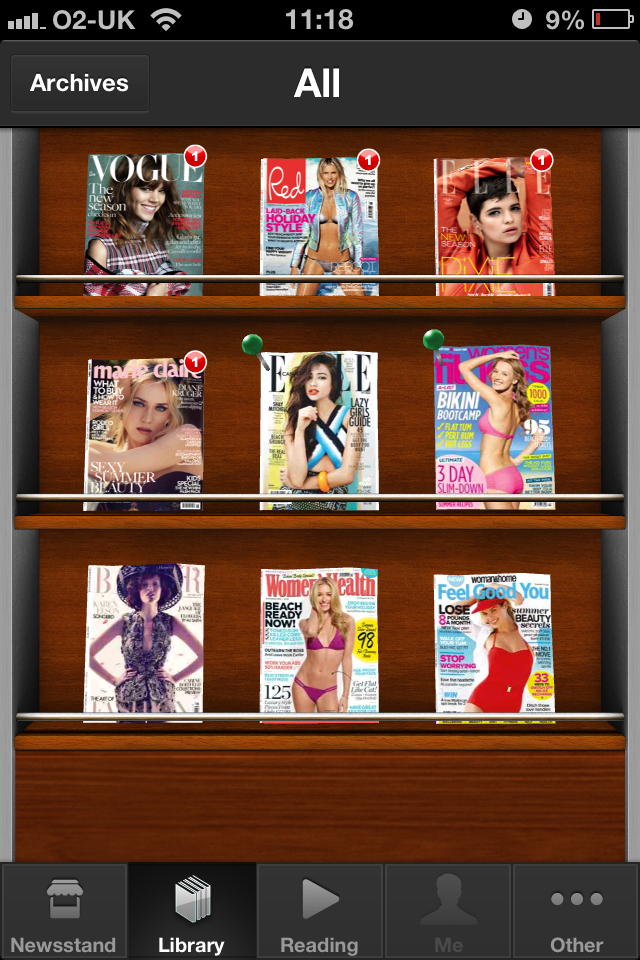
Here is my library of magazines that I have picked up so far. The ones with the number 1 I have not yet read. I am not sure what the pins mean. Any magazines that you have read remain in your library so if you want to go back to an article or read the whole magazine again you can. Here I have picked up Vogue UK, Red, Elle UK, Marie Claire UK, Elle Canada, Women's Fitness, Harper's Bazaar UK, Women's Health & Feel Good You. I wanted to try a variety of magazines that I don't usually buy so that I could see if I liked them. There are magazines from different countries too that you may not usually be able to pick up over in the UK so that's nice to see.
The reading button on this screen shows you the last magazine you were reading. The Me tab is your LeKiosk account information. In the Other tab are your purchases, regional store (UK or Italia), customer service and settings.
Half way through trialling out the LeKiosk app I was asked to try out the LeKiosk New. To be honest I have not noticed a difference in the way it works and the screens look the same. So here is how it looks on my phone.


LeKiosk and LeKiosk New are available for iPad, iPhone, iPod Touch and Web. It requires iOS 5 or later. App payments are made to Apple so no need to disclose your credit card information. Back issues of magazines are also available. Both the LeKiosk and LeKiosk New are free apps. I would personally suggest getting the LeKiosk New simply beacause it has more titles. There are bundle options or you can make single purchases of magazine titles.
The pages of the magazines are very clear as you can see. You can double tap once to zoom or twice to zoom further. You can also use your fingers to zoom in on certain areas more specifically.
I do think this app is a great idea for those on the go. Although there are handbag size versions of some magazines now it does save you carrying something extra around. Handy for the fashionista who wants to carry her dainty clutch, but still read her favourite magazines on her travels.
Personally I prefer picking up a magazine and flicking through the pages. I am the same if I read a book though. My full time job means that I use a computer 9 hours a day and obviously thereafter at home I am on my laptop in the evenings and weekends so a paper magazine or book are my preferred options.
Here are the magazine's on offer:
Find BBC Good Food Magazine, BBC History Magazine, BBC Knowledge
Magazine, BBC Lonely Planet Magazine, BBC Top Gear Magazine, BBC
Wildlife Magazine, Countryfile, Easycook, Focus UK, Gardeners'World,
Gardens Illustrated, Homes & Antiques, Junior, Olive Magazine,
Practical Parenting & Pregnancy, Prima Baby, Sky at Night, Who Do
You Think You Are, You and Your Wedding, Brides, Conde Nast Traveller,
Easy Living, Glamour, GQ Style, GQ, House & Garden, Tatler, The
World of Interior, Vogue, Wired, Wired Annual, Classic Trial, Trial
Magazine, Auto Express, Bizarre, Computer Shopper, Custom PC, Digital
SLR Photography, Evo, Fortean Times, Health & Fitness, Land Rover,
Mac User, Men's Fitness, Micro Mart, Octane, PC Pro, The Week, Viz, Web
User, Women's Fitness, 442 UK, Autocar, Autosport, Classic & Sport
Car UK, f1 Racing UK, Motorsport News, Practical Caravan, Practical
Motorhome, Stuff UK, What Car ?, What hifi UK, 25 Beautiful Homes,
Amateur Gardening, Amateur Photographer, Beautiful Kitchen, Country
Homes & Interiors, Country Life, Cycle Sport, Cycling Active,
Cycling Fitness, Cycling Weekly, Decanter, Essentials, Golf Monthly,
Homes & Gardens, Horse & Hound, Ideal Home, International Boat
Industry, Living Etc, Marie Claire UK, Motor Boat Monthly, Motorboat
& Yachting, Mountain Bike Rider, NME, Nuts, Girls of nUTS, Practical
Boat Owner, Rugby World, SuperYacht World, The Field, TV &
Satelitte Week, TV Times, Uncut, Uncut Ultimate, What Digital Camera,
What's On TV, Woman & Home, Woman & Homes Feel Good You,
Woman & Home's Feel Good Food, World Soccer, Yachting Monthly,
Yachting World, The Spectator and much more… (Note: the list is subject
to change. Check magazines availability from the application).
I have enjoyed trialling out this app so thanks to Diffusion PR.
Have you tried out the LeKiosk and/or LeKiosk New apps? If yes, what are your thoughts on them? If no, are they something that appeals to you and why? Let me know in the comments below.
Love to you all